Coastly: A Relaxing Handwritten Font
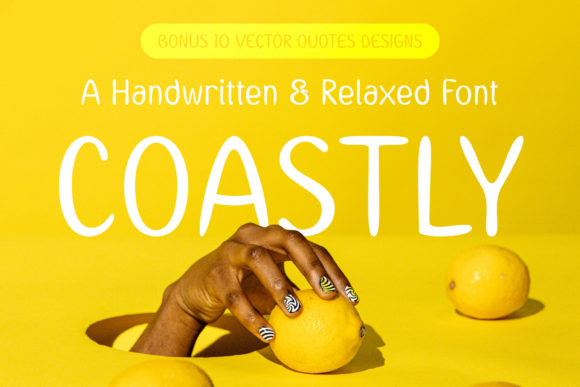
There I was, staring at a blank brand board, trying to find the right visual voice for a small coastal café looking to refresh its identity. The owner wanted something that felt warm, approachable, and evoked the feeling of a summer afternoon by the water. That’s when I reached for Coastly, a handwritten font that makes you think about vacation, summer, holidays, friends, and family.
The Visual Personality of Coastly
Coastly has a soft, flowing script with subtle variations in stroke weight that give it a handcrafted feel. It doesn’t feel overly ornate or fussy, which is a relief. The letters have a natural rhythm, as if they were written with a pen on a sunny day. It’s not too casual, but it’s not stiff either. This balance makes it versatile for a variety of branding applications.
When I first tested it on a logo concept, I was struck by how it felt like a breath of fresh air. It brought a sense of ease and familiarity, which is exactly what the café needed. The font’s personality isn’t loud, but it’s confident enough to stand out in a headline or on a packaging label.
Testing Coastly in Real Projects
I used Coastly on a range of design assets, from business cards to social media graphics. On a business card, it added a personal touch without being overwhelming. The font’s swashes and ligatures gave it a polished look, making it feel like a premium font even in small sizes.
On a website header, Coastly worked well as a display font, drawing attention without competing with the rest of the layout. It paired nicely with a clean sans serif for body text, creating a nice contrast that kept the design from feeling too busy.
In a packaging mockup, Coastly stood out on a product label. It made the brand feel more authentic and connected to the idea of a local, handmade shop. The font’s relaxed style complemented the café’s new visual identity, reinforcing the message of comfort and community.
When Coastly Shines
Coastly excels as a display font, especially for headlines, logos, and short phrases. It’s ideal for projects that want to convey a laid-back, friendly vibe. Whether it’s a quote on a poster, a tagline on a flyer, or a headline on a social media post, Coastly adds a human touch that other fonts might lack.
It also works well as an accent font, adding a unique flair to design elements without overpowering the main message. Pairing it with a serif or sans serif font can create a balanced, modern typography system that feels both professional and creative.
For a skincare brand, Coastly could be used on a product name or a tagline, helping to communicate a sense of calm and wellness. In a bakery packaging design, it could add a personal, artisanal feel that resonates with customers looking for something handmade and genuine.
Limitations and Considerations
While Coastly is great for display purposes, it’s not ideal for long body text. Its intricate details and varying stroke weights can make it hard to read in smaller sizes or when used extensively. For this reason, it’s best reserved for headlines, logos, and short phrases rather than full paragraphs.
It also may not be the best choice for formal corporate branding. If the goal is to project professionalism and authority, a more structured typeface would likely be more effective. However, for businesses aiming for a relaxed, approachable image, Coastly can be a strong asset.
Before using Coastly in client work, it’s important to test it across different mediums. Print, digital, and screen displays can all affect how the font appears. Checking how it looks on a shop sign, a product mockup, or a printed card can help ensure it meets the project’s needs.
Font Pairing and Practical Tips
When pairing Coastly with other fonts, consider balancing its fluidity with something more structured. A classic serif font like Georgia or a clean sans serif like Lato can provide a nice contrast. This combination helps maintain readability while allowing Coastly to shine where it matters most.
For a more modern look, pairing it with a decorative or display font can add visual interest without cluttering the design. Just be mindful of not overcomplicating the layout. Sometimes less is more, especially when working with handwritten fonts that already have a lot of character.
Coastly comes in multiple styles, including alternates, ligatures, and swashes, which can be useful for customizing the look. These features allow for greater flexibility in design, making it easier to adapt the font to different branding needs.
When using Coastly in commercial projects, always check the licensing terms. Some fonts may require additional licenses for web use, print, or merchandise. Making sure you have the right permissions can save time and avoid legal issues down the line.